For Tesla · Model S · Model 3 · Model X · Model Y
Read your car. All of it.
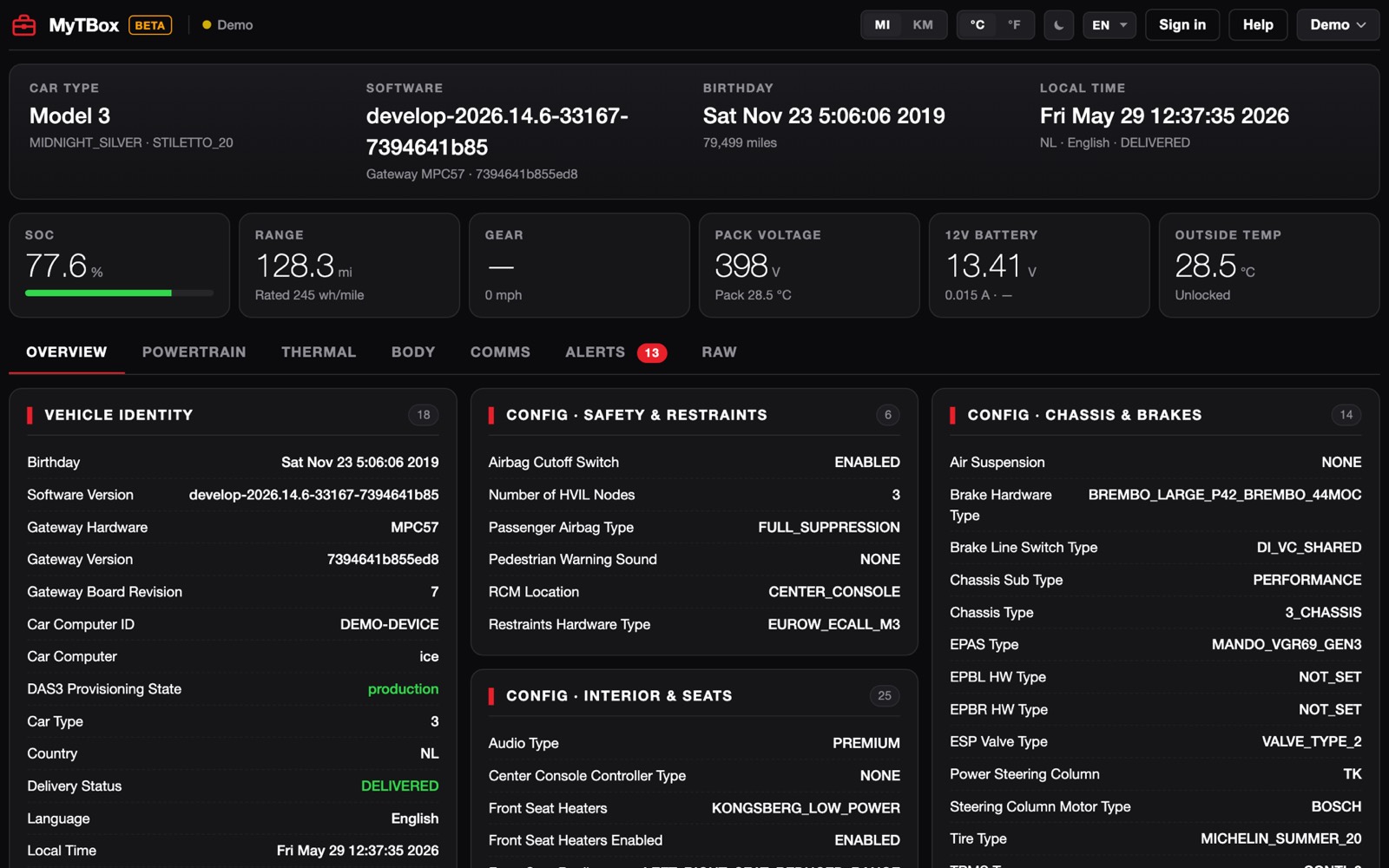
Get to know your car in depth — every configuration, every state. Its exact factory build, every option and what’s enabled or switched off, live battery signals, charging, and every alert it has logged. A complete diagnostic reading in plain language, live in your browser. No unknowns, nothing hidden.
€4.99 / month (shown in your local currency at checkout). Cancel anytime.
- Real signals from the car — not a cloud guess
- Runs in your browser — nothing to install
- No expensive manufacturer subscription, no shop visit
- Your car’s data stays yours
- Plain language, in your language
- 250–340values per reading, straight from the car
- 17,000+alert codes recognised
- 6languages — English, Deutsch, Français, Español, Українська, Български
- 0apps to install — it runs in your browser
What you see
Not a made-up health score. The actual signals your car reports about itself — decoded into plain language.
Real battery signals, live
Cell balance (how far apart your strongest and weakest cells are), capacity readings, pack voltage and temperatures, charge limits, the 12V system. These are the live numbers a technician actually looks at to judge a pack. You see them too — the real figures, not a guessed percentage.
Alerts you can actually read
Every active and past alert, decoded into plain language: what it means, when it fires, how it clears. No cryptic codes to google. Copy or share any one of them with a tap.
Do you really know your Tesla?
Not just “2019 dual-motor” — the full truth. Exact trim and chassis, the real manufacture date, drivetrain, brakes, driver-assist hardware, audio and connectivity packages, and hundreds more factory options most owners never see. Know exactly what you own — or, before you buy, exactly what’s really in front of you.
Print, save or share it
Export every reading in one click — copy it, download a spreadsheet, or print a clean report (or save it as a PDF). A shop can capture a snapshot the moment a car arrives; a buyer can send the full read to a mechanic or a seller. Your data is yours to take with you — included, no extra charge.
Charging & thermal, watched live
Watch the pack charge in real time: current, voltage, power limits, and every temperature across the battery and cabin loops. You can see how hard the car is working to stay cool, and whether charging is behaving the way it should.
Catch problems early
A cell imbalance that’s slowly widening. A quiet alert the dashboard never bothered to show you. A charge limit that crept down over months. These show up here long before a warning light does — so you can deal with it before it turns into a bill.
Organized so you actually find it
Professional diagnostic tools bury this behind menus and training — you need to know exactly where to look. MyTBox lays it out in clear, grouped sections with plain-language labels, so anyone finds what they need in seconds. And it speaks your language: English, German, French, Spanish, Ukrainian and Bulgarian.
A real reading beats a clever guess
Cloud estimates
Other tools show you a tidy battery “health %.” It’s modelled from app pings and fleet averages — a guess that’s days behind reality and never sees your actual cell balance, your alerts, or what’s really going on inside the pack.
MyTBox
We read the actual car, right now, over the same diagnostic signals a service centre uses: cell balance, capacity, charge limits, battery alerts. Then we put them in language you can act on. Real readings, not an invented number.
Know exactly what you’re buying
A new Tesla is sold as a finished configuration, and a second-hand listing rarely tells you more than the model and the colour. MyTBox reads the car’s own record of how it was built and how it’s set up today — laid out line by line.
The full build sheet
- Exact build date and time — down to the second
- Original paint, wheels and interior trim
- Fast charging: enabled or switched off
- Autopilot hardware and driver-assist level
- Audio system, connectivity package, radio tuner
- HomeLink, tow package, fog lights, air suspension
- Winter components — seat, steering-wheel and wiper heaters
- Plus live battery signals and every active and recent alert
Spot a car that’s been changed
Compare what the car says it is with what’s in front of you. A different paint colour means a respray or a wrap. Different rims mean aftermarket wheels. Fast charging switched off is something you want to know before you pay, not after. No unknowns, nothing hidden.
Take the reading with you
Save the complete reading, print it, or send it on — to your mechanic, to a buyer, or to the auction house. A clear record of the car’s build, state and alert history in one document.
The car has to be powered on, in Park and in Service Mode, with its key inside — the reading comes from the car itself. The level of detail varies by model and build year.
Who it’s for
Owners
It’s your car — read it the way a service centre does. One cable and your browser show the battery’s real signals — cell balance, capacity readings, charge limits — plus charging behaviour, thermal health and every quiet alert. Out of warranty, knowing what’s actually happening is the difference between a calm decision and an expensive guess.
Used-Tesla buyers
You’re standing in a stranger’s driveway, about to hand over €30,000. Plug in, and in minutes you’re reading the car itself: real battery signals, the exact trim and options, the true manufacture date, the alert history — and whether any of it matches the listing. Send the read to your mechanic, or use it to talk the price down. One month of MyTBox costs less than one wrong purchase.
Independent shops
A Tesla in the bay no longer means someone else’s toolchain at someone else’s prices. Read the vitals at intake in under a minute, print the snapshot for the job file, hand the customer an independent second opinion — and quote with numbers, not maybes. No manufacturer subscription, no per-day technician fee.
Fleets & rentals
Five cars or fifty: check each one’s battery signals and alerts on a schedule, log a snapshot at every handover and return, and catch the car that needs attention before it strands a customer at the airport. All from a browser — no per-car software fee.
Real situations MyTBox is built for
No jargon, no guesswork — just the moment you actually need to know.
“I’m 20 minutes from paying for a used Model 3.” Plug in, read the real battery signals and alert history, and know what you’re buying — before the money leaves your account.
“My range looks worse this winter.” See whether it’s just the cold and your charge limits — or a real change in the pack’s signals — instead of guessing or paying for a diagnosis.
“A Tesla just rolled into my bay.” Capture a full vitals snapshot at intake in under a minute, print it for the job file, and give the customer an independent second opinion.
“We leave at dawn.” A quick read the night before — charging healthy, no quiet alerts, temperatures normal — so the only surprise on the drive is the scenery.
“Every buyer asks about the battery.” Read your own car, share the real signals, and defend your asking price with evidence instead of “trust me”. A listing with data beats a listing with adjectives.
“The shop says it might be the battery — thousands, just to open it up.” Read the pack’s own signals first. Walk in with data, ask sharper questions, and pay for the repair you need — not the one you feared.
Find the right cable for your car
Tesla changed the diagnostic connection a few times over the years. Pick your model and build year, and we’ll tell you exactly what to look for.
Most modern laptops no longer have an ethernet port. You will also need a USB-C (or USB-A) to ethernet adapter — any gigabit model from a reputable brand (TP-Link, UGREEN, Anker, Amazon Basics) works.
Tesla material often mentions CAN or PCAN adapters. You don’t need those for MyTBox — we only use the standard ethernet (LAN) connection. Anything labelled CAN/PCAN is a different diagnostic interface; skip it.
Up and running in three steps
-
1
Plug in the cable
Connect the diagnostic cable to your car’s service port and to your computer’s ethernet — a built-in port, or a USB-C or USB-A adapter. Keep Wi-Fi on for internet.
-
2
Enable Service Mode
Switch your car into Service Mode from its screen. On the latest Model 3/Y, MyTBox can prompt the car to offer it with a single tap — no menu hunting.
-
3
See everything
Open MyTBox in your browser, click Connect, and read every vital your car reports — decoded into plain language and refreshed live.
Questions, answered
Is it safe? Will it change anything on my car?
MyTBox only reads. It listens to the diagnostic data your car already publishes and shows it to you — it never sends commands, changes settings or writes anything back to the vehicle.
Does this void my warranty?
No. MyTBox is read-only — it only reads the diagnostic data your car already reports, and never sends commands, writes, flashes, or changes anything. Because it doesn’t modify your vehicle in any way, simply viewing your own car’s data with MyTBox doesn’t affect your warranty. (As always, refer to your vehicle’s warranty terms for the specifics.)
How is this different from a battery-health app?
Most battery-health apps print a “health %” estimated from cloud data and fleet averages — a model, not a measurement. MyTBox reads the actual car through its diagnostic port and shows you the real signals — cell balance, capacity readings, charge limits and battery alerts — so you judge the pack from real indicators, not a guessed score. Which signals appear can vary slightly by model and build.
Which Teslas does it work with?
Model S, Model X, Model 3 and Model Y. The diagnostic connection changed over the years, so use our cable finder above to get the exact cable for your model and build year.
Do I need to install anything?
No. MyTBox runs entirely in your web browser — there’s nothing to download or install. You just need the right cable and an ethernet connection (built-in, or a USB-C or USB-A adapter).
What happens to my car’s data?
Your readings are yours. We don’t sell your data, and your car’s identifying details never leave your control. See our Privacy page for the specifics.
Can I cancel anytime?
Yes. It’s €4.99 a month (shown in your local currency at checkout), cancel whenever you like — no contract, no lock-in. Buying a single used car? One month is all you need.
See your Tesla as it really is.
Start with the free, live demo — no sign-up, no cable required. Subscribe when you’re ready to connect your own car.
We’re in beta — try the free demo, and the connection check confirms your car works before you’re ever charged. Questions? hello@mytbox.io.